





What Is EPUB 3?
The Complete Guide to the Modern eBook Standard
EPUB 3 is the current international standard for digital books, built on HTML5, CSS3, and JavaScript. It replaced EPUB 2 to give authors and publishers far more control over layout, media, and accessibility — everything from embedded audio and video to fixed layouts for comics, textbooks, and children’s books.
Two versions are in active use: EPUB 3.2, still the most widely supported, and EPUB 3.3, the current official W3C standard. Files remain fully backward-compatible, so a book built to the 3.0 spec still opens correctly on readers built for 3.2 or 3.3.
If you’re preparing a manuscript for Amazon KDP, Apple Books, Kobo, or IngramSpark, EPUB 3 is the format you want — it’s also now Amazon’s required upload format for new Kindle eBooks, since Amazon phased out MOBI uploads in March 2025.
Need your manuscript converted? See our professional ebook formatting service for hand-coded, retailer-ready EPUB files.
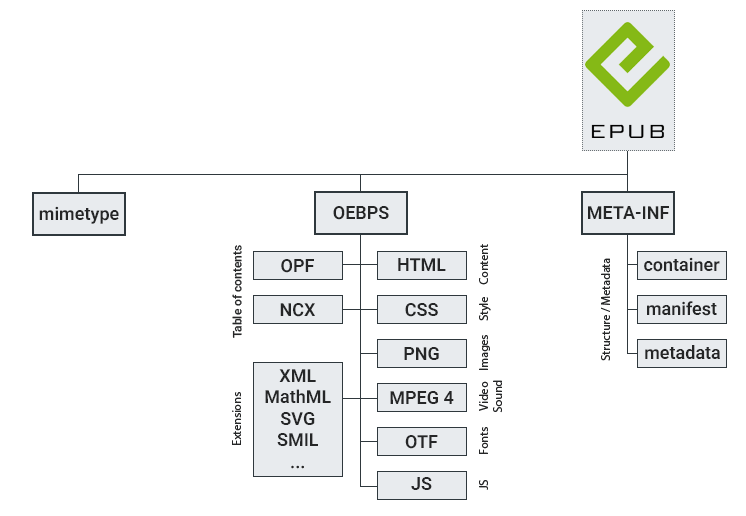
EPUB Structure
EPUB 3 vs. EPUB 2: What Changed
| EPUB 2 | EPUB 3 | |
|---|---|---|
| Markup | XHTML 1.1 | HTML5 |
| Styling | Limited CSS | Full CSS3 |
| Media | Text/images only | Audio, video, interactivity |
| Layout | Reflowable only | Reflowable + fixed layout |
| Accessibility | Minimal | Built-in WCAG-aligned support |
| Typography | Latin-based | Global scripts, vertical text |
An EPUB 3 file isn’t one document — it’s a packaged archive (technically a zipped folder) containing your book’s HTML content, a stylesheet, embedded fonts and images, and metadata files that tell reading apps how everything fits together.
Key Features and Benefits of EPUB 3
- Web standards-based. Built on HTML5, CSS, and SVG, enabling semantic markup like,
section,aside, andfigurefor cleaner, more meaningful structure. - Multimedia integration. Supports embedded audio and video for interactive reading experiences.
- Fixed layouts. Gives precise control over page design, critical for graphic-heavy books, magazines, and children’s picture books.
- Advanced typography. Proper support for global languages, including right-to-left text, vertical writing, and complex scripts.
- Accessibility. Improved screen-reader support and semantic content structure, helping publishers meet WCAG 2.2 requirements.
- Interactivity. JavaScript support for quizzes, animations, and other interactive elements.
EPUB 3 Structure & File Formats
- Packaging: EPUB 3 uses the Open Container Format (OCF), bundling every component into a single
.epubfile. - Navigation: An XHTML Navigation Document powers the table of contents and structured navigation.
- Fonts: Supports both OpenType and WOFF/WOFF2 for reliable font embedding across devices.
Do You Need to Convert to EPUB 3?
If your book is currently in MOBI, DOCX, or an older EPUB 2 file, converting to EPUB 3 isn’t optional anymore for most retail channels — it’s the baseline requirement. The catch is that a raw, auto-converted EPUB 3 file is often riddled with broken navigation, inconsistent styling, and accessibility gaps that get flagged during retailer review.
Frequently Asked Questions
Is EPUB 3 backward compatible with older readers? Yes. EPUB 3 files retain 100% backward compatibility with EPUB 3.0, so content built years ago still displays correctly in current reading apps.
Do I need EPUB 3 for Amazon KDP? Yes — Amazon now requires EPUB (or DOCX/KPF) for new Kindle uploads; MOBI is no longer accepted.
Can EPUB 3 files include audio and video? Yes, EPUB 3’s multimedia support allows embedded audio and video, though most retail eBook platforms strip or ignore this for standard fiction/nonfiction listings — it’s mainly used for interactive and educational titles.
Get a Hand-Formatted, Accessibility-Compliant EPUB 3 File
Auto-converted EPUB files are the #1 cause of rejected uploads and broken formatting on Kindle, Apple Books, and Kobo.
TrioMarketers hand-codes every EPUB 3 file to meet current WCAG 2.2 accessibility standards and retailer specifications — no broken TOCs, no styling surprises.